I'm too lazy to put together a decent guide, so here's a school-looking-ass website to help :)
Installing
The modpack can be installed in any Modrinth-supporting launcher, but I recommend using ATLauncher as it can both update private Modrinth packs, and manage your Java installation - so it's less work for you!
Steps
- Download the ATLauncher
- Login with your Minecraft account
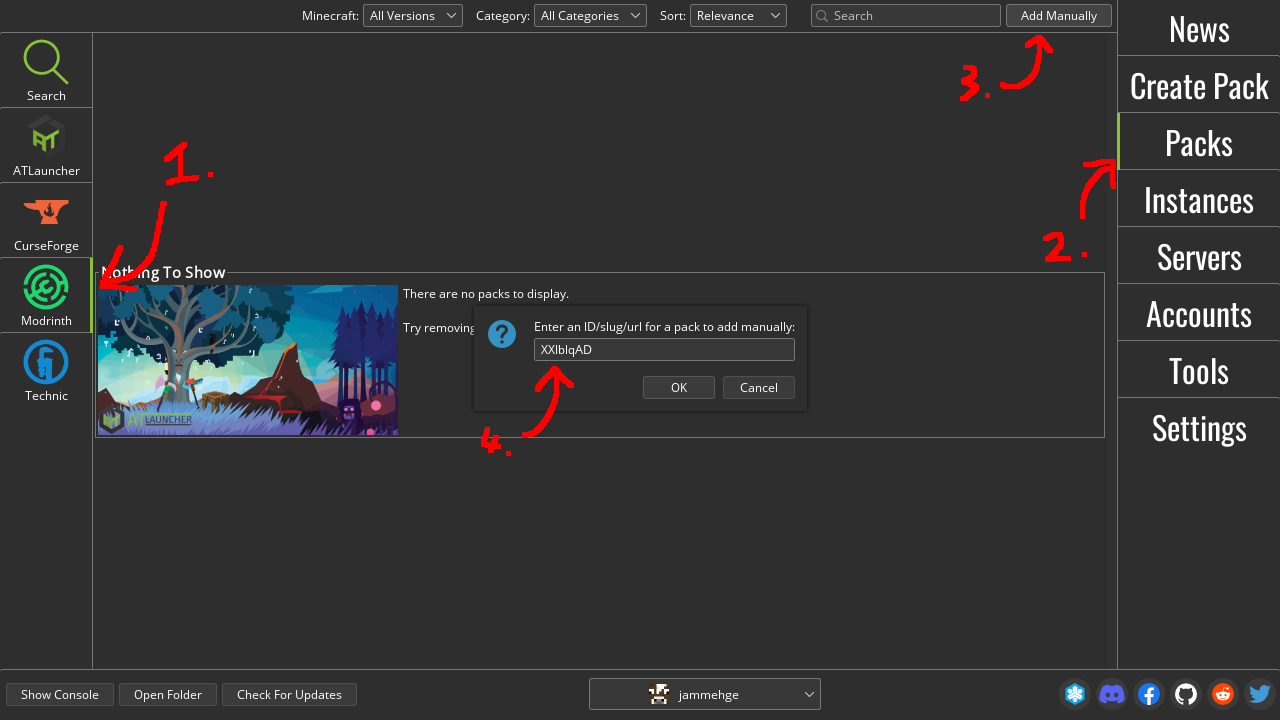
- Navigate to the Packs tab
- Click on "Modrinth" on the left-hand side
- Click on "Add Manually" and enter the pack's ID
XXIblqAD - Your pack should now be installed under the Instances tab!
- Read the post-installation steps below!!!
Post-installation steps:
- It's recommended to increase the amount of RAM allocated to the pack to ~6GiB, which you can do by opening the instance's settings and changing the Maximum Memory value to
6144. Don't do anything higher than 10GiB -
If you want to get relatively consistent performance out of your game, consider adding these JVM flags in your instance's settings:
-XX:+UnlockExperimentalVMOptions -XX:+UnlockDiagnosticVMOptions -XX:+AlwaysPreTouch -XX:+DisableExplicitGC -XX:+UseNUMA -XX:NmethodSweepActivity=1 -XX:ReservedCodeCacheSize=400M -XX:NonNMethodCodeHeapSize=12M -XX:ProfiledCodeHeapSize=194M -XX:NonProfiledCodeHeapSize=194M -XX:-DontCompileHugeMethods -XX:MaxNodeLimit=240000 -XX:NodeLimitFudgeFactor=8000 -XX:+UseVectorCmov -XX:+PerfDisableSharedMem -XX:+UseFastUnorderedTimeStamps -XX:+UseCriticalJavaThreadPriority -XX:ThreadPriorityPolicy=1 -XX:AllocatePrefetchStyle=3 -XX:+UseG1GC -XX:MaxGCPauseMillis=37 -XX:+PerfDisableSharedMem -XX:G1HeapRegionSize=16M -XX:G1NewSizePercent=23 -XX:G1ReservePercent=20 -XX:SurvivorRatio=32 -XX:G1MixedGCCountTarget=3 -XX:G1HeapWastePercent=20 -XX:InitiatingHeapOccupancyPercent=10 -XX:G1RSetUpdatingPauseTimePercent=0 -XX:MaxTenuringThreshold=1 -XX:G1SATBBufferEnqueueingThresholdPercent=30 -XX:G1ConcMarkStepDurationMillis=5.0 -XX:G1ConcRSHotCardLimit=16 -XX:G1ConcRefinementServiceIntervalMillis=150 -XX:GCTimeRatio=99 -XX:+UseLargePages -XX:LargePageSizeInBytes=2m
Known Issues
- Zooming with
Cdoesn't seem to work. Haven't bothered to look into it
Help
Improving performance:
There are a lot of mods in this pack, which may take a toll on your hardware. If you're struggling to get decent frames out of the game, try the following:
- Reduce your render distance
- If you're lagging during rain, disable features of Psection Rain in the mod menu
- If you're having very specific issues (mods crashing etc.), reach out to me directly